How to Create Consistent AI Characters Across Multiple Scenes
The reliable way to keep the same AI character — same face, hair, body and wardrobe — across every shot of a video or campaign, using a locked reference identity and an image-to-video workflow.
To keep an AI character consistent across scenes, stop describing the character with text in every shot. Instead lock one reference identity — a fixed set of face, body and wardrobe references — and drive every scene from that same reference using an image-to-video workflow. In Adkeet the Actor Creator builds that locked identity once (a full turnaround plus portrait), and every generation after it reuses the same actor, so the person reads as the same individual in every shot instead of drifting into a new lookalike each time.
Key takeaways
- Identity drift happens because most models generate each shot independently — they don't remember the last one.
- The single biggest fix is switching from text-to-video to a reference-image / image-to-video workflow.
- Lock the identity ONCE (multiple angles), then reuse it everywhere — never re-describe the face per scene.
- Use continuity frames between clips so the end of one shot seeds the start of the next.
- Expect small drift on hands, teeth and extreme angles — plan shots that hide the hardest cases.
Why AI characters change between scenes
Most text-to-video and text-to-image models generate every shot independently. They don't carry memory of what they made a moment ago, so even an identical prompt gets sampled slightly differently each time — a phenomenon creators call identity drift. The face shifts, the hairline moves, the jaw narrows, the wardrobe recolors. The fix is not a better sentence; it is giving the model the same *visual* reference to copy every time instead of asking it to re-imagine the person from words.
Text description is not identity
"Brown-haired woman, late 20s, green jacket" describes a category, not a person — millions of faces satisfy it. Two generations from that sentence are two different people who happen to match the description. Identity has to be pinned to pixels (a reference image), not adjectives.
One angle is not enough
A single front-facing photo leaves the model guessing at the profile, the three-quarter and the back of the head. When a scene turns the character, it invents those unseen angles — and invention is where drift creeps in. Multiple locked angles remove the guessing.
Step 1 — Lock the identity once in the Actor Creator
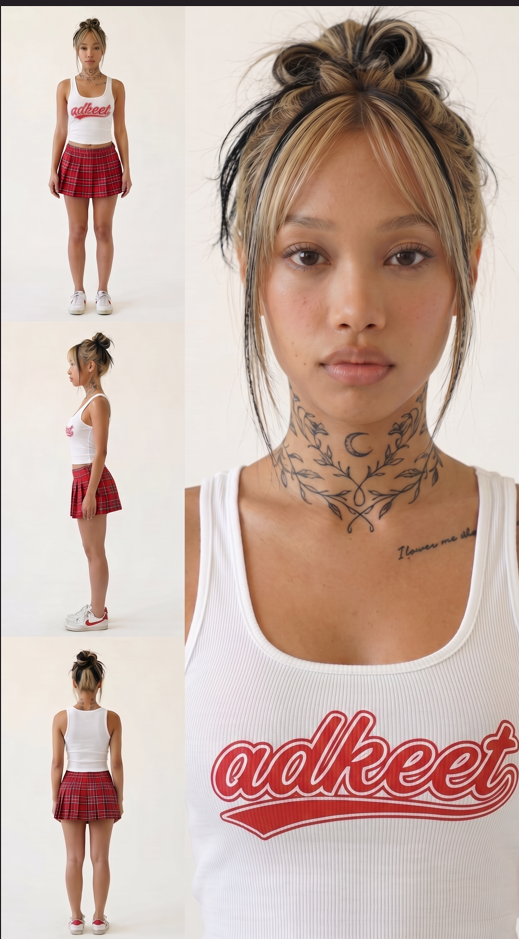
Open the Actor Creator and build your character a single time. You can design a brand-new person from scratch — face, physique, hair, wardrobe — or upload your own face to clone yourself — that second option lives in the Create actor dialog in the editor's Cast panel, not on the standalone builder page. Adkeet generates a turnaround sheet plus a portrait, so the identity is captured from several angles at once, not just the front. That locked actor becomes the reference every later shot pulls from.
Keep a wardrobe and prop note
Identity is more than a face. Write down the signature wardrobe palette, hairstyle and any recurring props once, and keep them the same across shots. A character whose jacket subtly changes color every scene still reads as "not the same person" even when the face is perfect.
Step 2 — Drive every scene from the same reference (image-to-video)
This is the step that fixes consistency. Rather than typing a fresh description per shot, start each scene from your locked actor and add only the motion and setting — where they are, what they do, how the camera moves. The face and wardrobe come from the reference; the prompt only changes the world around them. Because the same reference seeds every shot, the character stays the same individual scene after scene.
Prompt the scene, not the person
Good per-shot prompt: *"[same actor] walks into a sunlit kitchen, sets down a coffee cup, handheld camera follows."* You are describing blocking and camera — never re-describing the hair or face, which the reference already owns.
Step 3 — Chain shots with continuity frames
For multi-shot sequences, use continuity so shots connect. In the Cinematic Engine Studio, the Director Board can take the last frame of one clip as the first frame of the next (a continuation), or bridge two clips by seeding the start of one from the end of another. This keeps pose, lighting and identity carrying across the cut instead of resetting at every clip boundary — the same principle real editors use to keep a scene feeling continuous.
Storyboard before you generate
Plan the shot list first so each clip knows what came before and after. A quick storyboard makes continuity deliberate instead of accidental — decide each shot's framing and the character's position before you spend a single generation.
Limitations & common mistakes
- Hands, teeth and fine jewelry are the first things to drift — frame shots so they aren't the focus of a hard close-up.
- Extreme angles the reference never showed (sharp back-of-head, heavy low-angle) are where the model invents most. Add those angles to the reference if a scene needs them.
- Very long single clips accumulate drift over their duration; shorter clips stitched with continuity frames hold identity better.
- Dramatic lighting changes (silhouette, colored gels) can read as a different face even when geometry is identical — keep key lighting recognizable.
Frequently asked questions
Why do my AI characters look different in every scene?
Because most models generate each shot independently with no memory of the last one, so identical prompts sample slightly different faces (identity drift). Driving every shot from the same locked reference image instead of a text description removes the guessing.
How many reference images do you need for a consistent AI character?
More than one. A front view plus three-quarter, profile and back angles give the model far more to copy than a single headshot. Adkeet's Actor Creator captures a turnaround so several angles are locked at once.
Is image-to-video better than text-to-video for consistency?
Yes. Image-to-video seeds each shot from your character reference and only asks the model for motion, so the appearance is copied rather than re-invented each time. Text-to-video re-generates the person from words every shot, which is where drift comes from.
Can you keep the exact same face across a whole AI video?
Very close, yes — with a locked multi-angle identity, an image-to-video workflow and continuity frames between shots. Expect small drift on the hardest details (hands, teeth, extreme angles); plan shots that don't hinge on those.
Sources & further reading
- Consistent Character AI: Pro Tips & Workflow — Artlist
- AI Video Consistent Character Guide — Envato Elements
Written by
Adkeet Team · AI Creative StudioThe Adkeet team builds AI filmmaking and advertising tools — the Actor Creator and the Cinematic Engine Studio. These guides come from workflows we run inside the product every day.
Related tutorials
Create your consistent AI character
Lock one identity in the Actor Creator, then generate every scene from the same reference.